

1.13K
Hector Martin (@[email protected])
social.treehouse.systemsAttached: 2 images
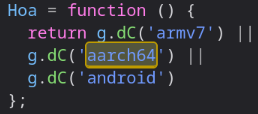
Today I learned that YouTube is deliberately crippling Firefox on Asahi Linux. It will give you lowered video resolutions. If you just replace "aarch64" with "x86_64" in the UA, suddenly you get 4K and everything.
They literally have a test for "is ARM", and if so, they consider your system has garbage performance and cripple the available formats/codecs. I checked the code.
Logic: Quality 1080 by default. If your machine has 2 or fewer cores, quality 480. If anything ARM, quality 240. Yes, Google thinks all ARM machines are 5 times worse than Intel machines, even if you have 20 cores or something.
Why does this not affect Chromium? **Because chromium on aarch64 pretends to be x86_64**
`Mozilla/5.0 (X11; Linux x86_64) AppleWebKit/537.36 (KHTML, like Gecko) Chrome/120.0.0.0 Safari/537.36`
🤦♂️🤦♂️🤦♂️🤦♂️🤦♂️
Welp, guess I'm shipping a user agent override for Firefox on Fedora to pretend to be x86.
**EDIT**: The plot thickens. Pretending to be ChromeOS aarch64 *still gets 4K*. Specifically: `Mozilla/5.0 (X11; CrOS aarch64 10452.96.0) AppleWebKit/537.36 (KHTML, like Gecko) Chrome/66.0.3359.181 Safari/537.36` still works.
I wish Piped worked for me, I was trying to watch a Linux tutorial in full HD to see the commands better and Piped just refused to buffer the video.
There are other alternatives too, like invidious. The yewtu.be instance works decently well for me but limits to 720p I think. There is a list of all running instances somewhere on the github iirc. There’s other instances that allow full HD, just have a search and you should be able to find one.
Just redirect any watch page to https://redirect.invidious.io/watch?v=%ID% and you will get a list of instances. Can be setup with Redirector in a minute