You must log in or # to comment.
Microsoft intentionally made programs install to C:\Program Files on Windows 95+ to force programmers to deal with spaces in filenames.
Someone make one of those “statements made by the utterly deranged” memes about it, please and thank you.
what is even more funny about this is that the name of that directory used to be locale-dependent, so in sweden it was just called “Program”, completely nullifying that idea.
C:\Program Files
C:\Program Files (x86)
C:\ProgramData
C:\PROGRA~1
me coming back to cmd after spending a month in command.com:
The fucking parenthetical x86 absolutely kills me. I don’t normally wish dick cancer on people,
It’s only localised in the file explorer. The actual folder name is always Program Files.
Only since vista, it used to be localized.
what about placeholders/variables like %localappdata%, %windir%, %programfiles%?
I can only assume these always existed, otherwise it would have been a nightmare for everyone.
Excel used to have, and I think it still has, localised function names.
Makes it a nightmare to look up stuff on the Internet.
Still does. Commas or semicolons as separators in functions differ at least. It fucking sucks.
the entirety of office has localised hotkeys. whaddayamean ^F is “search”? it’s for fat text!
I very intentionally have all my code in
Personal Projects 🥰andWork Projects 🏦directories so I can find bugs in the handling of file paths.My work has me working with Matlab Simulink paths, which may (and sometimes actually do) contain newlines.
I\ don\'t\ know\ what\ you\ mean,\ I\'ve\ never\ encountered\ any\ annoyances.
'I don\'t know what you mean, I\‘ve never encountered any annoyances.’
Single quotes don’t allow any escaping in shell, you need
'I don'\''t know what you mean, I'\''ve never encountered any annoyances'Or, in Zsh with
setopt rcquotes:'I don''t know what you mean, I''ve never encountered any annoyances'Oh right, good catch. That’s me shell scripting while in a meeting. 🫠
Good use of a meeting to be fair
it works in fish
not sure why the default behavior is this:
file\ name\ with\ a\ bunch\ of\ spacesinstead of this:
"file name with a bunch of spaces"but you can just press
"before pressing tab to auto-complete, and it will use the 2nd formI mean, at least in Bash tools like
lsdo use quotes by default:$ ls filename_without_space 'filename with space'But yeah, tab expansion uses backslashes, sadly.
Because quoting requires token expansion (e.g. ~ to /home/you). Escaping gives you a much shorter path in that case.
That said I’m with you, full quoted paths read better to me.
You can use variables in
"like so:cd "$HOME/Desktop".Maybe this helps?
I’ve recently learned that in Linux, you can use emois in filenames. I died a
littlelot inside when I learned that.On Linux file systems you can use any character except NULL, and / is a reserved character.
E.g. on ext-4 “All characters and character sequences permitted, except for NULL (‘\0’), ‘/’, and the special file names “.” and “…” which are reserved for indicating (respectively) current and parent directories.”
I once accidentally created a file with a newline character in it… it was pretty tricky to fix from command line.
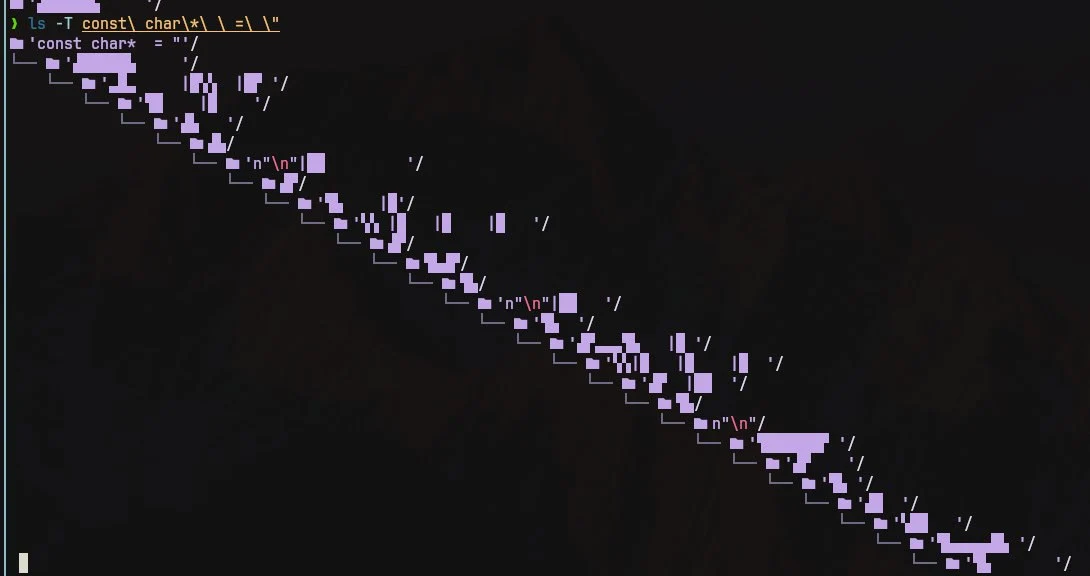
Arrest this person
This is absolutely haram
it was on accident, habibi, I swear 😁. I messed up some cmake code for preprocessing .txt ascii sprites into constants and accidentally created this abomination
I once made a script to delete .o, .lib, and .so files from my huge dev folder to free up space on my home partition.
It did not go as planned.
O no, o no no no
I created a file with backspace in name, it was hard to understand why filename doesn’t match
I actually did this a lot on classic Mac OS. Intentionally.
The reason was that you could put a carriage return as the first character of a file, and it would sort above everything else by name while otherwise being invisible. You just had to copy the carriage return from a text editor and then paste it into the rename field in the Finder.
Since OS X / macOS can still read classic Mac HFS+ volumes, you can indeed still have carriage returns in file names on modern Macs. I don’t think you can create them on modern macOS, though. At least not in the Finder or with common Terminal commands.
Did you not just use tab? That’s the usual method of dealing with weird characters in filenames that I’ve found
This was quite a while ago now, but I don’t think my shell escaped the tab complete properly, I remember it just printing a literal newline and evaluating it as a second command. I think there was other unicode in there too, otherwise I would have just typed it out. I had to do something with null terminated output and piping it in to
mv, but I can’t remember what exactly.Too bad when there’s multiple files starting with and consisting mostly of e.g. kanji (when on a Latin keyboard).
With the right shell, you can just press tab multiple times to cycle through the possible completions.
So … is allowed, or all whitespace, or Zalgo text.
I mean, on the one hand, I guess why be restrictive, but on the other I feel like requiring something that looks like language somehow might be a good idea to avoid edge cases and attacks.
You can have new lines in your file names. YSAP has a good video/playlist about how to deal with these and many more.
could you have
..? I assume most terminals would just spell out.\x200b.?Or use a hair space so it looks almost the same. Or … but you’ve added the right-to-left unicode character. I’m guessing there’s something that looks a lot like a period, too.
If ext4 doesn’t include restrictions terminals probably should.
In filenames? AMATEURS! Use obscure Unicode in your passphrases for maximum security. Ctrl-Shift-U, enter arbitrary code point, bam! 🦊 Works even better with a Compose key and a nice, chonky
.XComposefile to throw some gr∑∑k letters around, for instance, like some confused script kiddie. :)On topic: There are multiple variants of spaces in Unicode. You’re welcome, and now go and create something utterly deranged with that information.
Some grSSk letters?
yes, grSSk letters

unix filenames are just string of bytes, the operating system does not interpret it in anyway. this is a much saner approach compared to Windows where language settings can change file system behavior.
10 seconds of googling indicates this is true for Windows and Mac as well. I haven’t looked specifically, but I’d be a little surprised if it wasn’t true for Android and iOS as well.
But really, why would they add rules to prevent people from using certain unicode codepoints in filenames? Should they disallow Klingon as well? Kanji? Of course not. Emojis are codepoints just like U+0061 is.
Of course there are good reasons to disallow things like newlines and forward slashes in Linux filenames, but what specifically would even be the argument for preventing emojis?
⏰️.🪵
It’s all just Unicode
You can have emoji as your WiFi network name too
Kinda interesting to see what older devices do when faced with such a network
What about an emoji only wifi password?
I think that may be possible for every filesystem supporting UTF-8 encoding.
You can, but I downloaded some music the other day and I was trying to put the files onto my phone using KDE Connect, and I couldn’t understand why is wasn’t working until I got rid of the star emoji in the filenames. So I think Graphene/Android might still struggle with it.
Lol, I think that’s how I learned it was possible, too.
yt-dlpuses the title as the filename, and all of the emojis came along with it. Was trying to rename them from terminal, but couldn’t do much when half the filenames started with the fire emoji lol.
Oh\ come\ on,\ it\'s\ not\ that\ badSome shells enclose those types of files within inverted commas. Such that:
> ls
file\ name.md
is instead
> ls
'file name.md'
(I use fish)
“inverted commas”? single quotes?
Yes, I am a weird english.
What is the Old Continent name of those: `
On its own, the backtick is primarily used in computing, and so doesn’t have an old-timey-English name, nor does the Jargon File mention a Commonwealth Hackish name for it. While there are a variety of other names, I don’t think any of them are specific to the UK
When used with a letter, it marks a grave accent; this was its original purpose on a typewriter
Floating commas
In dutch I’ve heard them be called flying commas unapologetically (vliegende comma’s — ironically has one in it because many plurals need it, it doesn’t mark possession)
Ik heb nog nooit iemand een ’ een vliegende komma horen noemen, wordt dat in bepaalde delen van Nederland meer gezegd?
I tried to parse the first one but got all confused because there’s no closing single quote.
at least you/arent/using\ linux
Computers should just know when I want a space to be part of a file name, and when I want them to be argument separators. No more escaping or quoting.
deleted by creator
Are you typing the whole filename by hand? Tab expansion exists, you know?
If it fucking works…
Sometimes it does. But not always.
Zsh changed my life, but I still hate escape chars in my command lines for readability reasons
i y’all just started using fish shell, you’d have proper shell completions and argument splitting that doesn’t care about spaces in file names
I still use spaces
agreed, “still worth it”
I do, however, tend to keep spaces out of my folder names so i can just use quotes at the end.
/Images/Halloween/Projections/“Creepy Crawlies.mp4”
Can’t relate. I use shell all the time, and I always use spaces in file paths, especially to make sure scripts I make still work then
" is your friend
Yep, exactly. And tab. \<space> is weird at first but makes sense if you think about it
Now I’m imagining a shell that looks iteratively through arguments to find where quotes would make total sense
$ ls
my victims.ods
$ wipe -f my victims.ods --thorough
So the shell would go like
wipe→ command name found, ok-f→ no file in the current directory starts with that, skipmy→ matches a file, keep in memory…my victims.ods→ full match, but missing quotes!- Prompt user:
Filename "my victims.ods" found without quotes. Choose: [a]dd quotes this time [A]lways add quotes (dangerous) [n]o quotes today please [N]ever offer adding quotes again [t]ell me what could possibly go wrong when I choose to always add quotes [P]unch the person who proposed this featureFor interactive use, tab-completion essentially makes this a non-issue, because shells add escaping in the appropriate places.
For scripting, where spaces are harder to deal with, unfortunately there’s just not much you can do; your two options are basically to learn all of your particular shell’s patterns for dealing with whitespace in filenames, or only write scripts in something other than a POSIX shell.
Scripting isn’t the issue, but for tab completion: the boundary is often at a space or parenthesis so that you need to type the backslash + char to continue tabbing to completion
Believe me, whitespace-correct scripting is absolutely an issue.
You’re right that it’s annoying when filenames diverge right at a character that must be escaped.