Unryzer.eu
  • Communities
  • Create Post
  • heart
    Support Lemmy
  • search
    Search
  • Login
  • Sign Up
cm0002@piefed.world to Programmer Humor@programming.devEnglish · 3 months ago

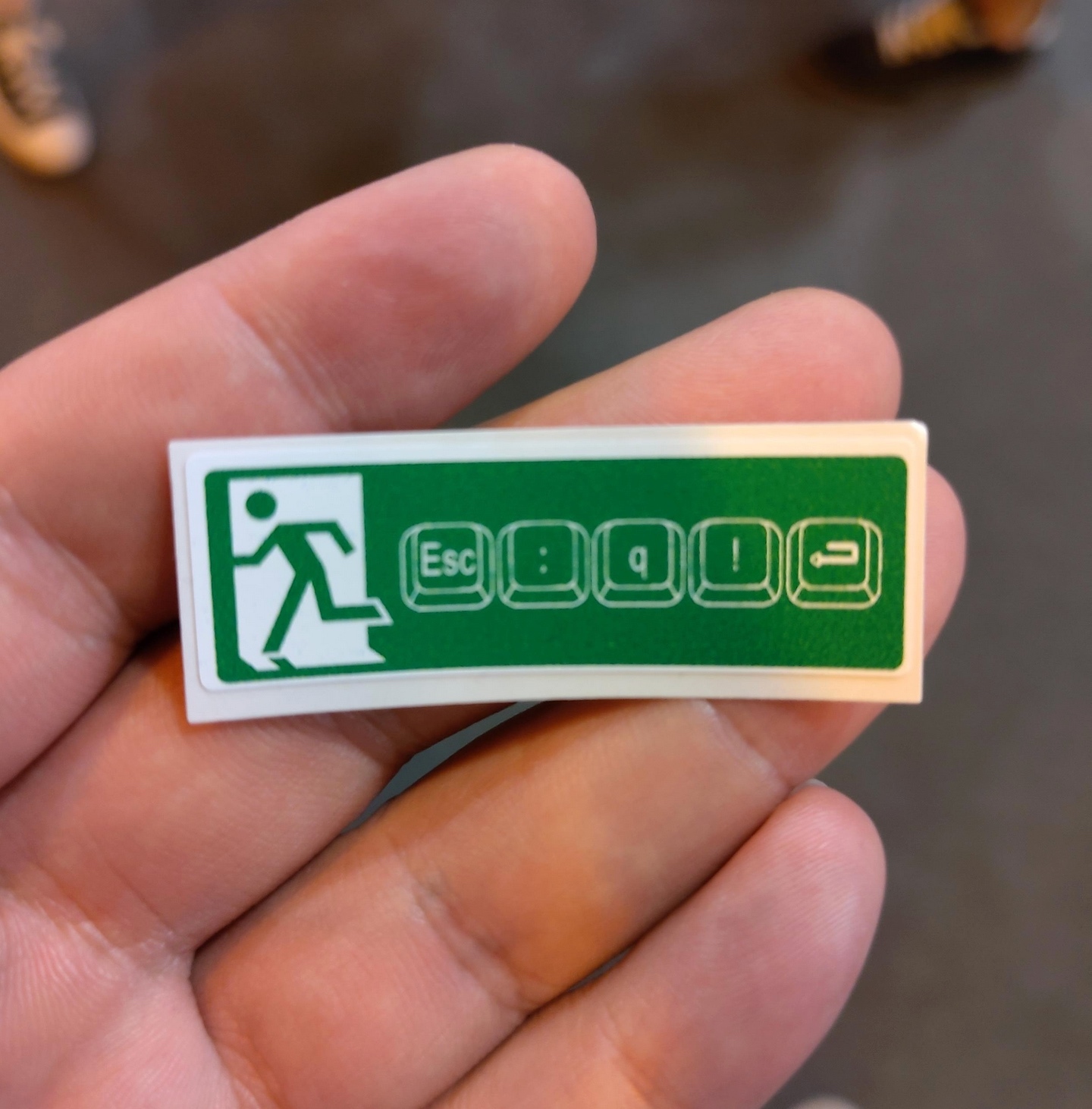
Exit Sign

message-square
28
link
fedilink
30

Exit Sign

cm0002@piefed.world to Programmer Humor@programming.devEnglish · 3 months ago
message-square
28
link
fedilink
alert-triangle
You must log in or # to comment.
  • NebLem@lemmy.world
    link
    fedilink
    arrow-up
    3
    ·
    3 months ago

    You all exit your editor? How you do the rest of your computing?

    /s with ♡ from an Emacs fan.

    • psud@aussie.zone
      link
      fedilink
      English
      arrow-up
      3
      ·
      3 months ago

      Emacs really is an excellent desktop environment

  • Speiser0@feddit.org
    link
    fedilink
    arrow-up
    4
    arrow-down
    1
    ·
    3 months ago

    On german QWERTZ keyboards, you need to use shift to make : and !.

    • Warl0k3@lemmy.world
      link
      fedilink
      arrow-up
      6
      ·
      3 months ago

      On US ones as well, I think they just put the relevant key-symbols and excluded the combination press as they can be assumed.

      • Victor@lemmy.world
        link
        fedilink
        arrow-up
        0
        ·
        3 months ago

        I have a custom keyboard with a QMK firmware. I enabled something called auto shift. It’s the best. Just hold down the key you want shifted, and it auto shifts. I settled for enabling this for capital letters and symbols. So comfortable not to have to press the shift key.

        • BassTurd@lemmy.world
          link
          fedilink
          arrow-up
          0
          ·
          3 months ago

          So you hold down the first letter of each sentence longer so that it capitalizes rather than hold shift? That feels like it would completely mess with my flow when typing. Shift just happens naturally for me and I don’t register I’m pushing it.

          • Victor@lemmy.world
            link
            fedilink
            arrow-up
            0
            ·
            3 months ago

            Exactly like that, yes. Or 1 for exclamation point, or 2 for @. Just like on a phone keyboard, with tap and hold for symbols and numbers and such.

            I’ve had this keyboard for a few months now and I didn’t enable it exactly for the reasons you mention.

            I enabled it a few weeks ago now just to try it, and wow, I though I didn’t notice myself pressing the shift key, that it “came naturally”. Boy was I wrong. Now whenever I have to use the shift key it feels so cumbersome lol. Typing has become so comfortable now.

            I use a ZSA Voyager for reference.

            • pipe01@programming.dev
              link
              fedilink
              arrow-up
              1
              ·
              3 months ago

              What if you wanna repeat a character?

    • The Ramen Dutchman@ttrpg.network
      link
      fedilink
      English
      arrow-up
      1
      ·
      2 months ago

      That’s basically all keyboard layouts.

    • Aatube@kbin.melroy.org
      link
      fedilink
      arrow-up
      1
      ·
      3 months ago

      Here in Tarzania we hold the superior and elusive ! key

  • 2910000@lemmy.world
    link
    fedilink
    arrow-up
    2
    ·
    3 months ago

    Works as long as you didn’t put something silly in your nvim config like

    vim.keymap.set("ca", "q!", "echo 'not so fast!'")
    
  • thesmokingman@programming.dev
    link
    fedilink
    arrow-up
    2
    ·
    3 months ago

    We’re just quitting without writing? Living very dangerously aren’t we?

    • shirro@aussie.zone
      link
      fedilink
      English
      arrow-up
      3
      ·
      3 months ago

      It is an emergency exit not a normal exit.

  • jenesaisquoi@feddit.org
    link
    fedilink
    English
    arrow-up
    1
    ·
    2 months ago

    Ctrl+] Shift+ZZ

    Amateurs.

  • twopi@lemmy.ca
    link
    fedilink
    English
    arrow-up
    1
    ·
    3 months ago

    Would it be q a ! ?

  • 1984@lemmy.today
    link
    fedilink
    arrow-up
    1
    ·
    3 months ago

    Or just ctrl-z to get out of it and “fg” to get back. :)

    • deadbeef79000@lemmy.nz
      link
      fedilink
      arrow-up
      1
      ·
      3 months ago

      Just buy a new computer.

  • katy ✨@piefed.blahaj.zone
    link
    fedilink
    English
    arrow-up
    1
    ·
    3 months ago

    how to quit vim

    1. pull computer cord out of wall
  • Ganbat@lemmy.dbzer0.com
    link
    fedilink
    English
    arrow-up
    1
    ·
    3 months ago

    vim something.log
    esc
    quit
    exit
    ctrl+x
    ctrl+q
    shushejehojwhatiwibaln):gufht;vfgs+_&f
    reboot
    nano something.log

    • tetris11@feddit.uk
      link
      fedilink
      English
      arrow-up
      1
      ·
      3 months ago

      shushejehojwhatiwibaln

      fond memories of this distro

  • thagoat@lemmy.sdf.org
    link
    fedilink
    arrow-up
    0
    arrow-down
    1
    ·
    3 months ago

    5 key presses to save and exit. Frickin vim.

    • TragicNotCute@lemmy.world
      link
      fedilink
      English
      arrow-up
      1
      ·
      3 months ago

      I’m pretty sure that’s close without saving changes. :wq would be needed to save.

      • Aatube@kbin.melroy.org
        link
        fedilink
        arrow-up
        0
        ·
        3 months ago

        To be precise, : means bring up commands, w means save, q means exit, and ! means force

        • HeuristicAlgorithm9@feddit.uk
          link
          fedilink
          arrow-up
          0
          ·
          3 months ago

          I think it’s w = write and q = quit so the letters make more sense

          • glitches_brew@lemmy.world
            link
            fedilink
            arrow-up
            0
            ·
            3 months ago

            Also :x is the same as :wq

            • darklamer@lemmy.dbzer0.com
              link
              fedilink
              arrow-up
              1
              ·
              3 months ago

              No, it isn’t, x writes only when changes have been made, while w writes unconditionally.

              • glitches_brew@lemmy.world
                link
                fedilink
                arrow-up
                1
                ·
                3 months ago

                TIL. Ty!

    • NeatNit@discuss.tchncs.de
      link
      fedilink
      arrow-up
      1
      ·
      3 months ago

      Depends how you count. Both : and ! require shift as well.

Programmer Humor@programming.dev

programmer_humor@programming.dev

Subscribe from Remote Instance

Create a post
You are not logged in. However you can subscribe from another Fediverse account, for example Lemmy or Mastodon. To do this, paste the following into the search field of your instance: [email protected]

Welcome to Programmer Humor!

This is a place where you can post jokes, memes, humor, etc. related to programming!

For sharing awful code theres also Programming Horror.

Rules

  • Keep content in english
  • No advertisements
  • Posts must be related to programming or programmer topics
Visibility: Public
globe

This community can be federated to other instances and be posted/commented in by their users.

  • 670 users / day
  • 3.36K users / week
  • 8.95K users / month
  • 18.1K users / 6 months
  • 1 local subscriber
  • 27.8K subscribers
  • 1.69K Posts
  • 50.9K Comments
  • Modlog
  • mods:
  • Feyter@programming.dev
  • adr1an@programming.dev
  • BurningTurtle@programming.dev
  • Pierre-Yves Lapersonne@programming.dev
  • BE: 0.19.14
  • Modlog
  • Instances
  • Docs
  • Code
  • join-lemmy.org